
APPLE BUILDS IMPRESSIVELY FAST COMPUTERS—and names them in an impressively confusing way.
Faced with M4, M5, and M6, most people reasonably conclude that the numbers tell the whole story. The higher number wins. End of discussion.
Not quite.
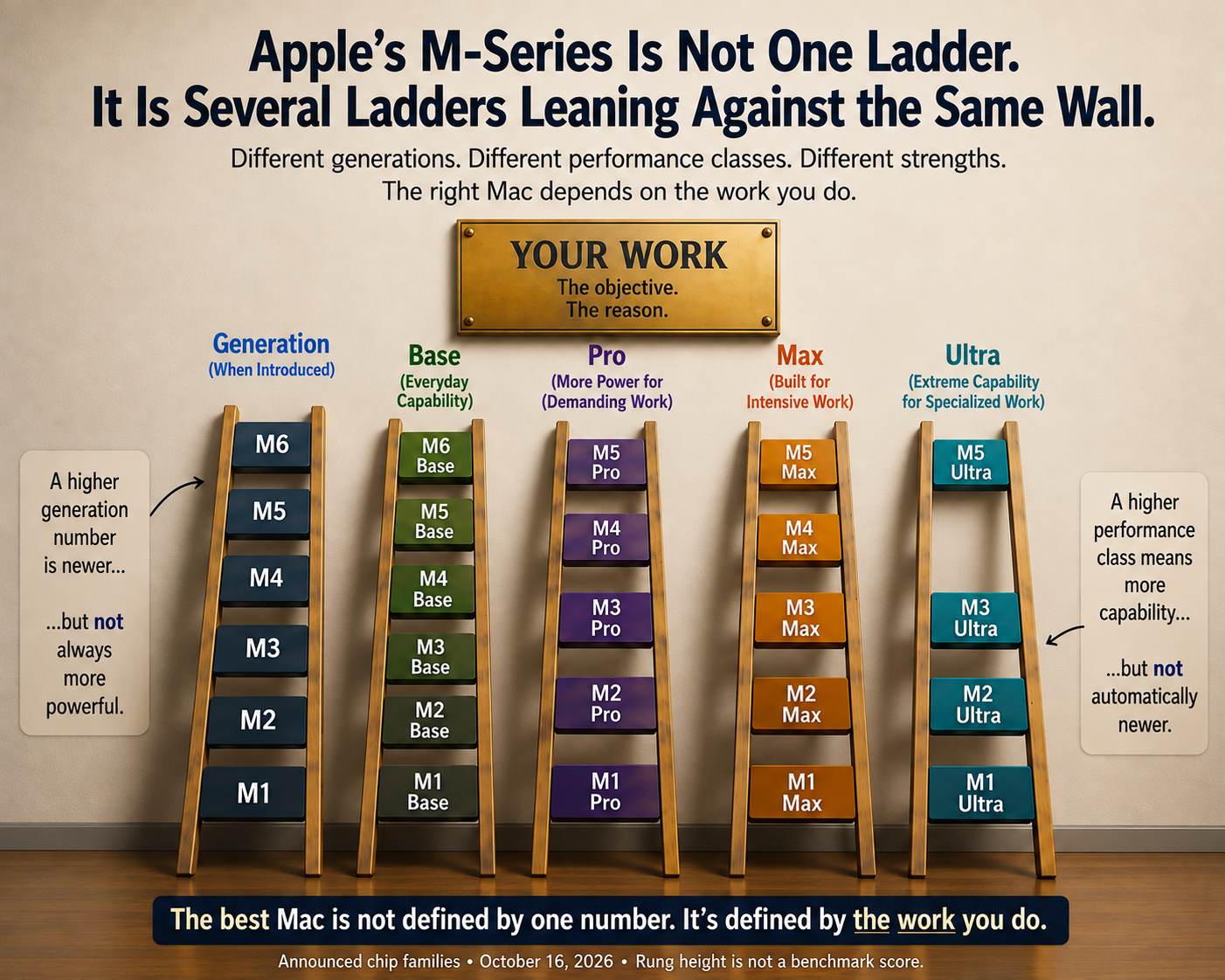
Apple uses two naming systems at the same time. The number marks the generation; the words Pro, Max, and Ultra mark the tier within that generation. To understand any chip, you must read the whole label.
The new M6 Mac mini puts that familiar confusion squarely into today’s buying decision. I ordered one to replace my M4 mini. Yet I also own an M5 Pro MacBook Pro, and I don’t plan to call it obsolete just because another computer has a six on the box.
The interesting question is how these machines fit the work we do.
Six Is Newer. Pro Still Means Something.
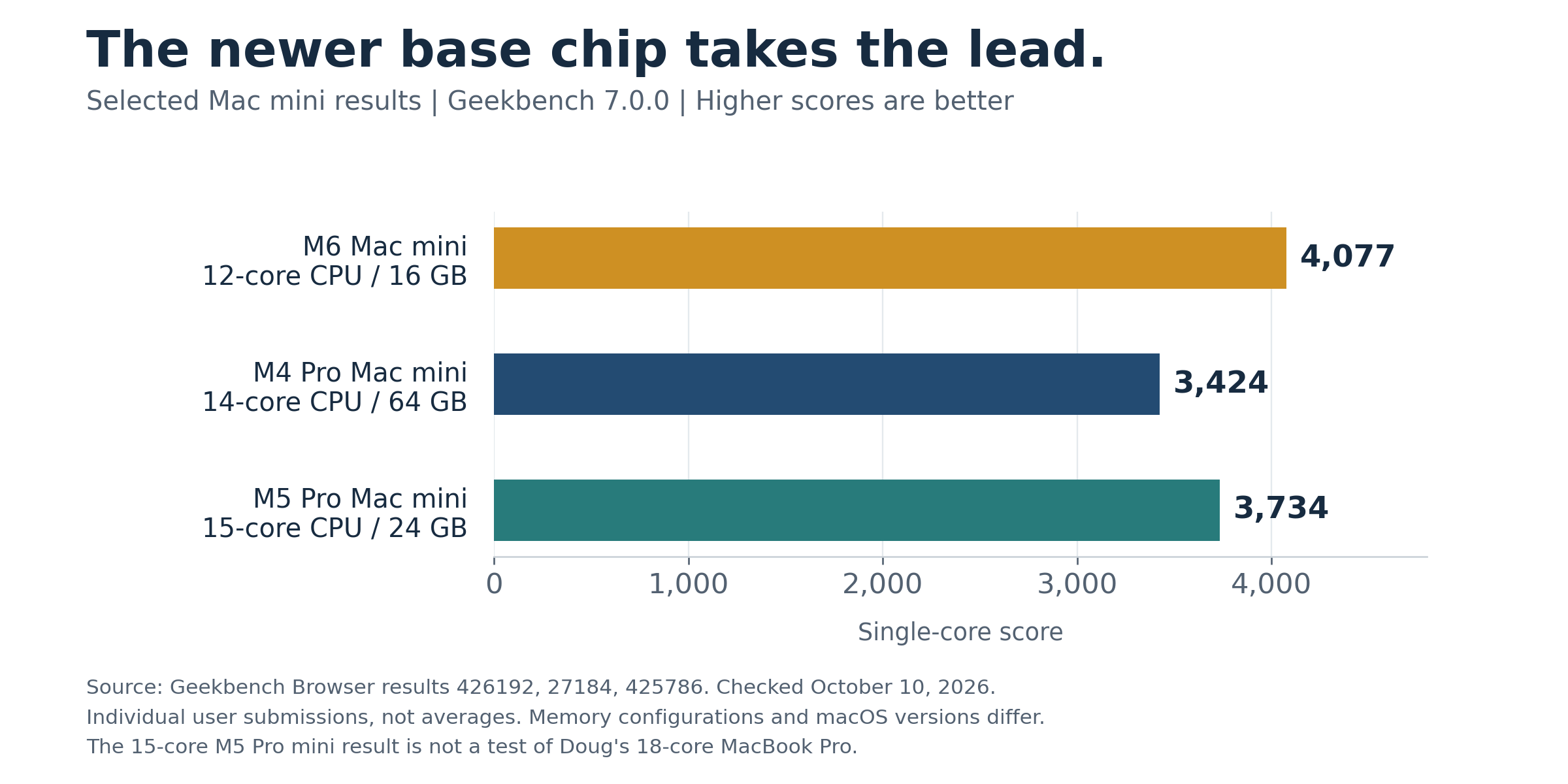
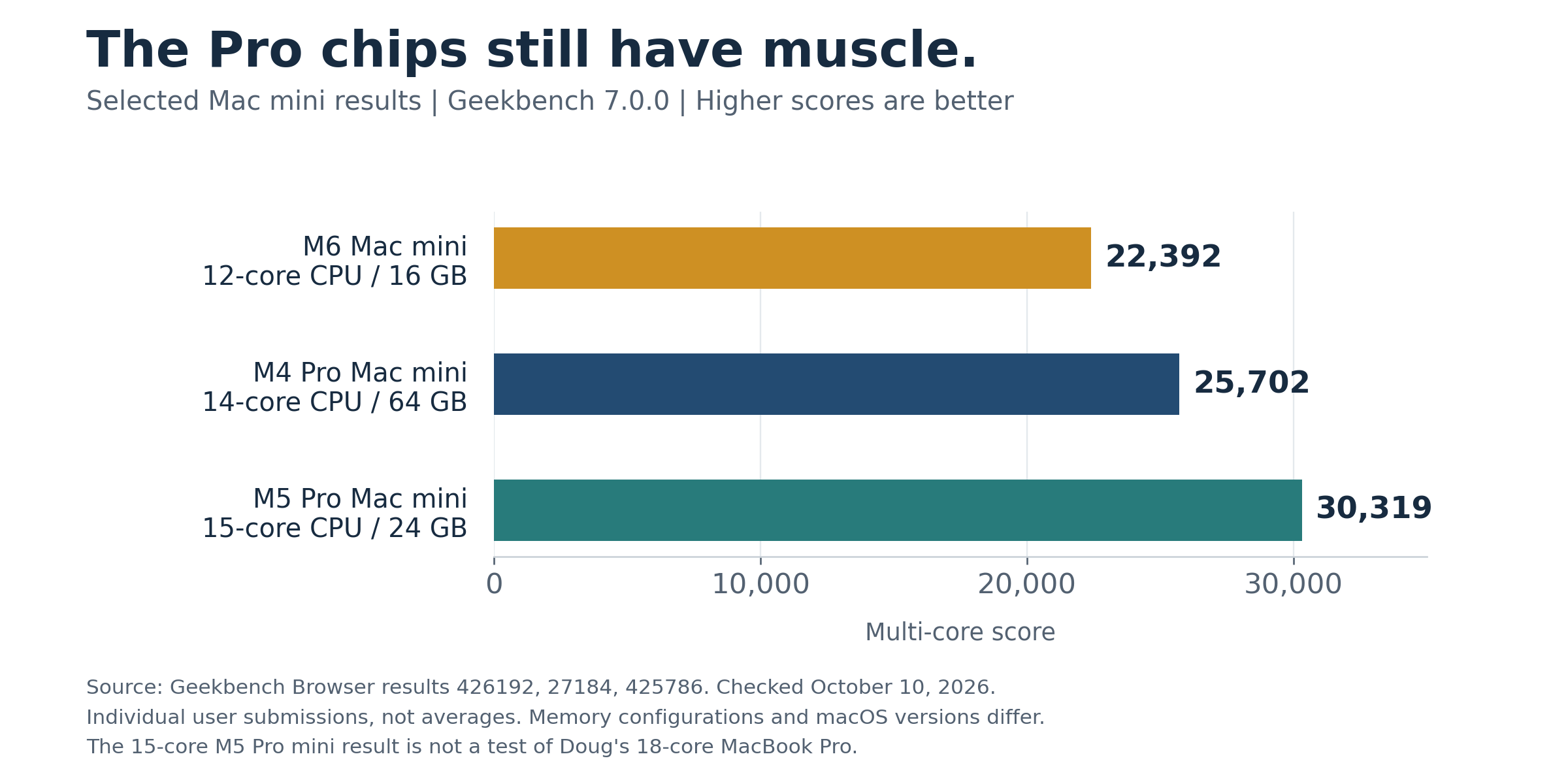
Apple’s own Mac mini lineup supplies a useful illustration: it currently offers the mini with either an M6 or an M5 Pro. The newer base chip and the previous-generation Pro chip sit side by side. [1]
Here are the configurations relevant to my decision. These are specifications, not benchmark rankings:
M4 Mac mini, base chip: 10 CPU cores, 10 GPU cores, 120 GB/s memory bandwidth.
M6 Mac mini, base 16 GB model: 12 CPU cores, 12 GPU cores, 153 GB/s memory bandwidth.
My M5 Pro MacBook Pro: 18 CPU cores, 20 GPU cores, 307 GB/s memory bandwidth.
Sources: Apple’s technical specifications. M5 Pro configurations vary; the row describes my 18-core version. Apple’s higher-memory M6 configurations list 170 GB/s rather than 153 GB/s. [1, 2, 3]
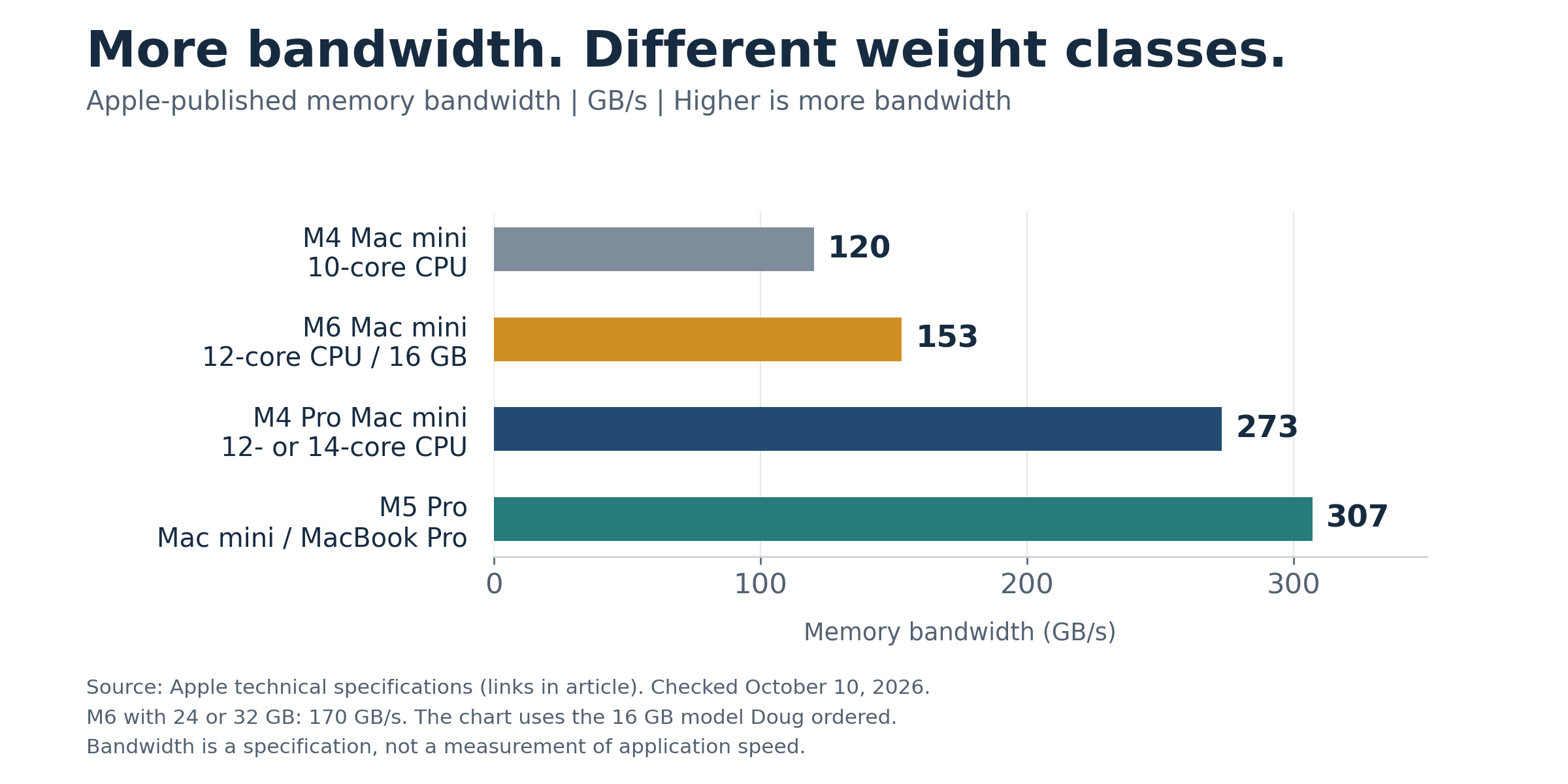
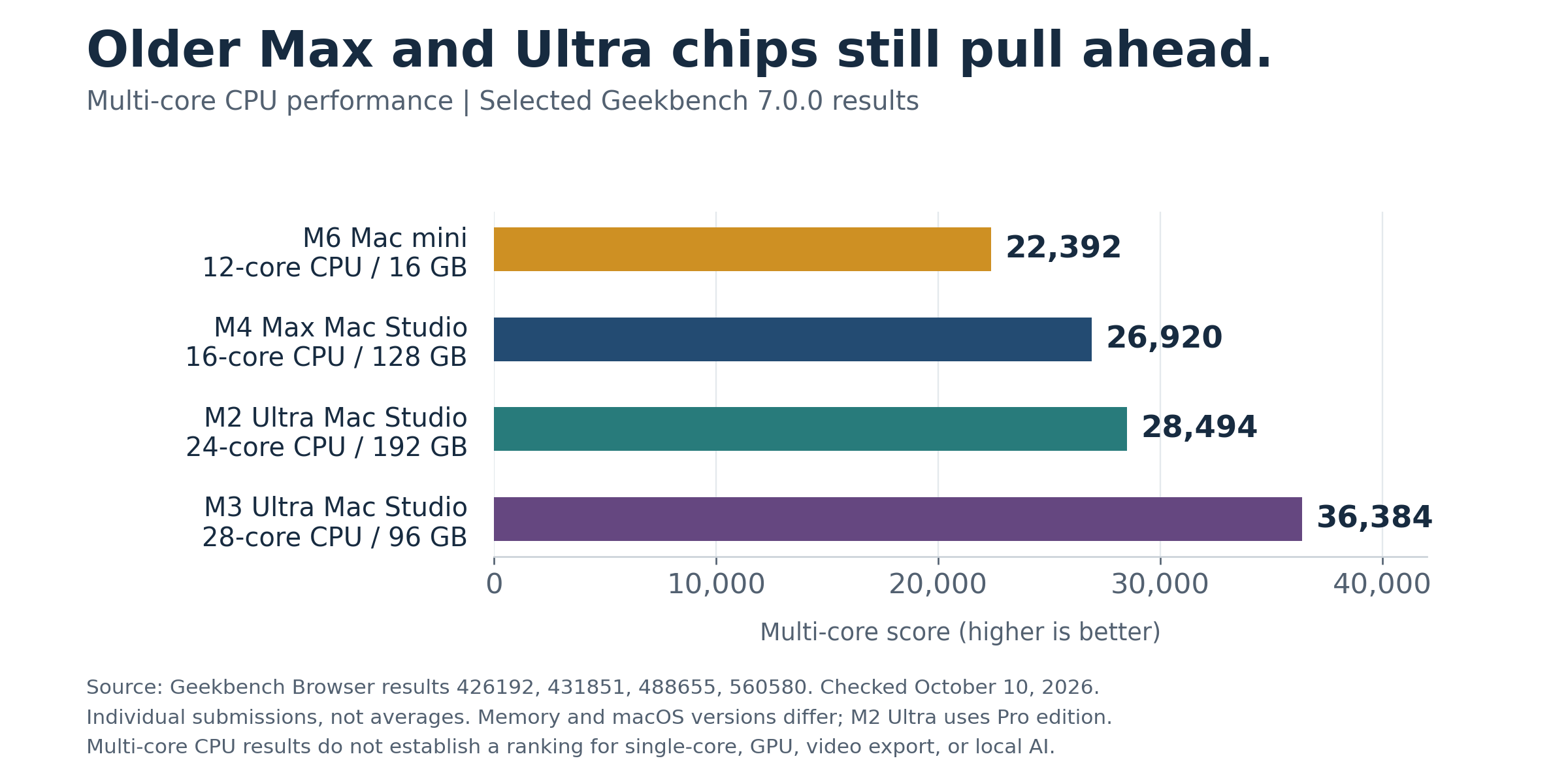
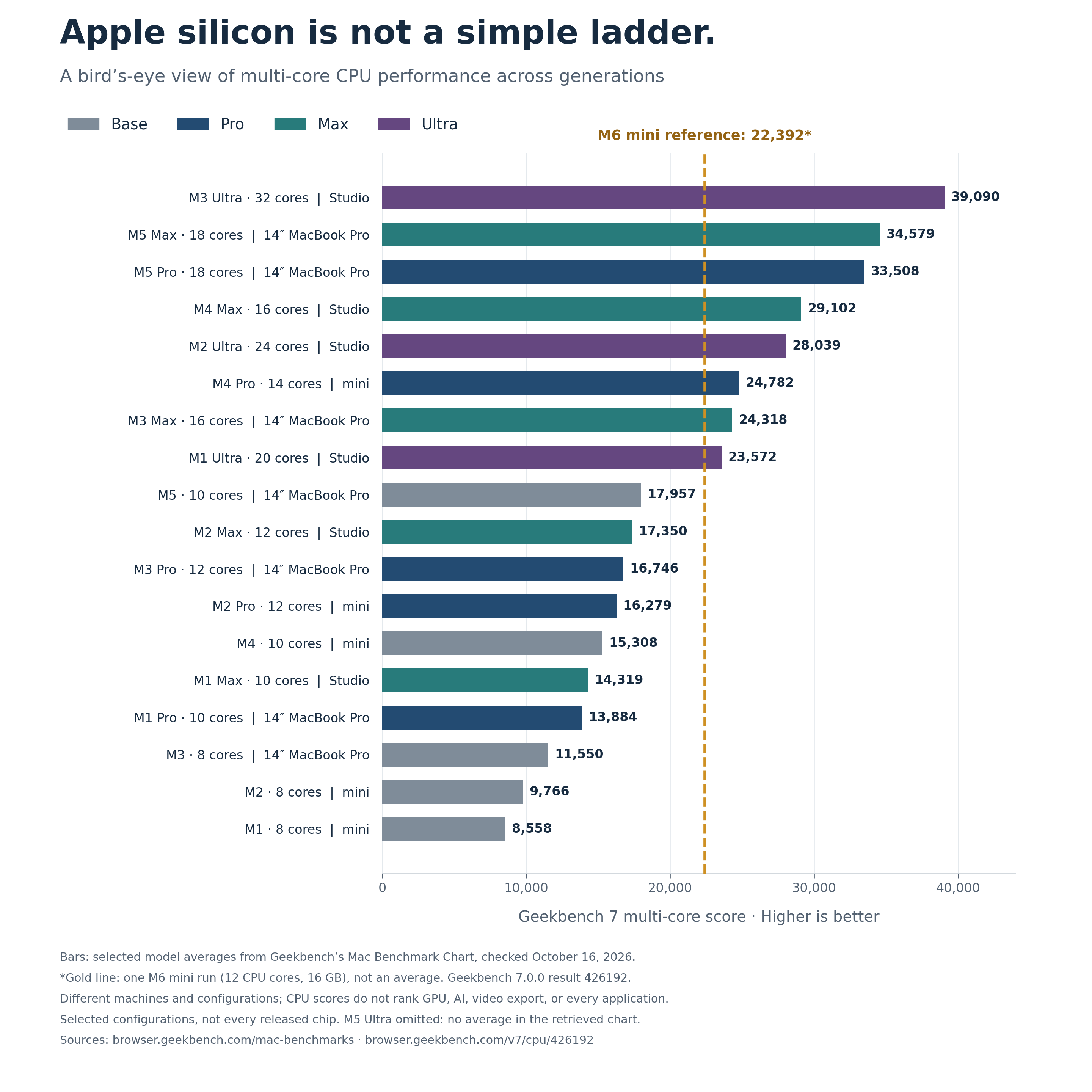
Those figures do not establish that the M5 Pro wins every task. Likewise, they don’t show that the M6 label wins every comparison either.
CPU cores from different designs are not interchangeable units. GPU cores are not either. And twice the memory bandwidth does not automatically mean twice the application speed.
Still, the professional chip has resources that matter when a program can use them. A newer generation can improve the engine while a different class supplies more machinery around it.
We are comparing overlapping weight classes, not climbing one tidy ladder.
M6 Versus M4: The Upgrade Question
My M4 mini has been doing real work: writing, research, presentations, and video editing. It did not stop being useful when Apple introduced the M6.
The specifications point to additional resources in the new machine. I’ll test whether those resources save me meaningful time once I put the new computer into service.
I want to open the same substantial manuscript, work with the same video project, and export the same finished film. Where possible, I will use the same software settings and external drive. Otherwise, it is too easy to credit the processor for a difference caused by storage or a different export setting.
Fast also has two meanings: One is responsiveness: how quickly the computer responds while we move through our work. The other is throughput: how much work it finishes during a long job. A machine can feel wonderfully quick without winning every sustained processing test.
Video adds another wrinkle. Supported exports can use dedicated media hardware. An export result is not simply a contest over the largest CPU-core count.
So, the honest M4 buying advice is this: if your current machine handles your work comfortably, a new number alone is a poor reason to replace it. If you repeatedly wait on demanding jobs, compare those jobs. And if an attractive purchase price and a successful resale narrow the cost of upgrading, that can change the arithmetic.
In my case, discounts and a gift card helped. The old Mini’s sale still must happen. I should not count the cheddar before it lands in the account. However, I left myself room to negotiate before the deal is done. The final price has to be reduced quite a bit before I lose money.
The Mini Against the MacBook Pro
My M5 Pro MacBook Pro has 24 GB of unified memory and a 2 TB internal SSD. The M6 mini I ordered has 16 GB of unified memory and a 256 GB internal SSD. That is a substantial difference in configuration before we even start arguing about generations.
The notebook also includes a screen, keyboard, battery, and portability. The mini needs a display and peripherals. Its purchase price makes more sense for someone like me who already has the desk equipment.
This is why “Which Mac is faster?” often hides the more useful question: “Which Mac fits this job at the right total cost?”
My intended division of labor is straightforward. The mini remains my everyday writing and video workstation. The MacBook Pro will handle local AI experiments and other work that benefits from its resources. That is a plan, not a claim that I have already measured the M6 against it.
Neither computer needs to defeat the other to earn its place.
The 256 GB Elephant in the Room
A small desktop is attractive. A small internal drive can be less charming.
Apple currently lists the entry M6 mini at $899 with 16 GB of memory and a 256 GB SSD. That is Apple’s price, not a promise about retailer discounts. [4]
Anyone working with video needs a storage plan for a 256 GB drive. Mine is to keep macOS and my applications on the internal drive and store large active projects on a 1 TB Kingston NVMe drive in a Yottamaster Thunderbolt enclosure. The enclosure uses Thunderbolt 4—the same standard the M4 and M6 minis offer. I wish Apple included more than 256 GB in the entry configuration and Thunderbolt 5 rather than Thunderbolt 4. Larger SSD configurations are available when ordering, but they cost more. The trade-offs are real, and they make the decision harder.
On my M4 mini, connected directly to a rear Thunderbolt port, Blackmagic Disk Speed Test showed approximately 1,207 MB/s writing and 2,689 MB/s reading with a 5 GB test setting.
Those are my measurements of that particular setup. They are not M6 benchmarks, and they do not guarantee sustained speed during every large transfer. But they give me a practical reason to reuse equipment I already own.
The external disk remains a separate drive. It does not turn 256 GB of internal storage into a larger internal SSD. Nor does it add unified memory.
That last distinction deserves attention. Storage holds files. Memory provides working space for running software. A fast external drive can help with the former; it cannot substitute for buying enough of the latter.
External storage also brings a cable, an enclosure, and a backup obligation. Both the internal disk and the working external disk need protection. More room is useful. Another unprotected place to lose a film is not.
And What About The Mac Studio?
The Studio deserves a passing mention because it answers a different question.
Apple’s current specifications list M5 Max and M5 Ultra versions, with substantially larger GPU and memory options than the base mini. The Ultra can be configured with up to 512 GB of unified memory. [5]
For local AI models that require a large memory pool, that capacity can make the Studio a strong candidate. But the useful choice depends on the model, its memory requirements, the software running it, and the budget. There is no universal “best AI Mac” independent of the task, just as there is no perfect AI model to run locally. You will always have to balance speed and storage space. Just remember the old adage: figure out the software and then pick the hardware to support it. That formula has worked for me through several generations of computers: mainframes, minicomputers, LANs, and microprocessors. Yeah, I’ve been around the block a few times. But the more things change, the more they stay the same.
Needless to say, for my writing-and-video desk, I don’t need a “studio-scale” machine. Other people do. A newer mini doesn’t erase their requirements, and an impressive Mac Studio doesn’t create those requirements for everyone else.
If you sail, compare computer scenarios to the lust for a larger boat: ah, just 3’ more will do nicely. Just a faster chip from a new generation will be the ticket. But as mentioned above, Apple made the decision harder: the $899 M6 entry price is $300 above the original $599 M4 launch price. Both of those entry configurations have 256 GB SSDs. [6] This presses the issue of knowing what you really need before you buy.
The Studio is larger than the mini, but it is still a compact desktop. Calling it a giant would miss the point. The question is whether its additional capabilities justify its cost for your work.
The Buyer’s Real Comparison
When comparing Macs, I would look at five things before falling in love with a generation number:
The exact chip and configuration. “Pro” might describe a chip or the MacBook product line. A MacBook Pro can have a base chip; “Mac Pro” is a separate desktop product.
Your workload. Writing a chapter, exporting a film, and running a local language model each demand something different.
Memory. A generous specification is useful only if you need it, but too little can become a daily constraint.
Total system cost. Include storage, display, docks, and backups, especially if you do not already own them.
The actual problem you want the upgrade to solve. Identify the wait, limitation, or inconvenience first.
The M6 mini does not have to beat every Mac Apple has ever made. However, it must deliver enough added performance at a sensible total cost to justify pulling out the credit card.
An older professional machine may remain the better tool for a demanding workload. An M4 already on your desk may remain the better value if it does everything you need. And a new M6 mini may be a very attractive purchase for someone who wants a compact desktop and has a realistic plan for memory, storage, and peripherals.
Apple’s numbers are generations, not verdicts. Buy the computer that helps you finish your work. But for heaven’s sake, hold enough cheddar back for the rest of the business purchases you absolutely must have.
Source notes
Specifications and Apple starting price rechecked October 16, 2026. No M6 hands-on results are claimed here. The external-drive measurement is Doug’s October 9 test on his M4 mini.
[1] Apple, current Mac mini technical specifications:
https://www.apple.com/mac-mini/specs/
[2] Apple, Mac mini (2024) technical specifications:
https://support.apple.com/en-us/121555
[3] Apple, MacBook Pro (14-inch, M5 Pro or M5 Max) technical specifications:
https://support.apple.com/en-us/126318
[4] Apple, Mac mini starting price and availability:
https://images.apple.com/newsroom/2026/09/the-new-mac-mini-and-mac-studio-are-available-today/
[5] Apple, current Mac Studio technical specifications:
https://www.apple.com/mac-studio/specs/
[6] Apple, M4 Mac mini launch pricing and storage:
Apple M4 Mac mini announcement
Current Mac mini configurations